Azure ML Training Pipeline
Build → Train → Evaluate → Register | CI/CD for ML
Production-grade Azure ML pipeline that automates model building, training, evaluation, and governed registration using CI/CD. Implementing MLOps best practices for reproducible, scalable machine learning workflows on Microsoft Azure.
Project Summary
Comprehensive Project Overview
Project Category
AI/ML + MLOps (Model Lifecycle Automation)
Industry/Domain
Cross-Industry (Enterprise AI Platforms / MLOps Infrastructure)
Domain: Machine Learning Engineering / MLOps
Cloud Platform
Microsoft Azure
Azure Machine Learning, Azure DevOps, Azure Resource Manager
Key Technologies & Concepts
Core Technologies Used
Platform Keywords
Problem & Objective
What problem did this project solve?
Problems Solved
- ML models were being trained in ad-hoc notebooks without reproducibility
- Lack of governance and consistent evaluation practices
- Difficulty comparing models and tracking experiments
- Challenges in safely promoting models for deployment
- No standardized workflow for model lifecycle management
Primary Objectives
- Build a repeatable, CI/CD-driven Azure ML training pipeline
- Standardize data preparation, training, evaluation, and model registration
- Implement experiment tracking with promotion gates
- Establish governance and reproducibility for ML workflows
- Enable objective model comparison and version control
Solution & Architecture
Architectural Overview
Solution Overview
Implemented an Azure ML pipeline orchestrated via Azure DevOps that automates data preparation, model training, evaluation on hold-out data, and conditional model registration into the MLflow Model Registry.
Automated ML training pipelines (Prep → Train → Evaluate → Register) using Azure ML Pipelines with MLflow integration for comprehensive experiment tracking and model governance.
Scalability & Reliability: Training runs scale horizontally on Azure ML compute clusters with autoscaling, while pipeline-driven orchestration ensures repeatable, fault-aware execution and consistent workspace context across runs.
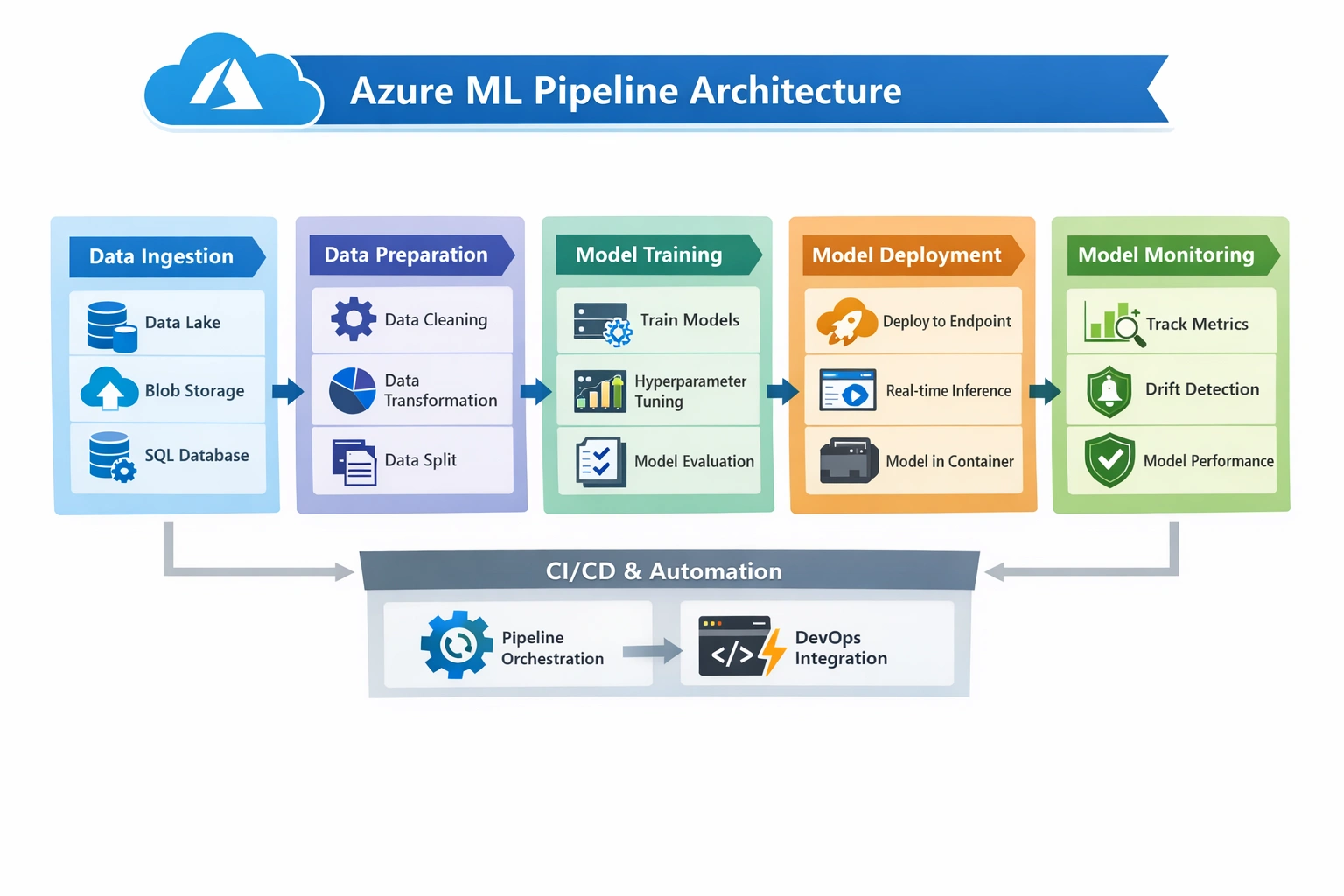
Key Components & Services
- Azure Machine Learning (Pipelines, Compute, Environments, Model Registry)
- MLflow (Tracking, Metrics, Artifacts for experiment management)
- Azure DevOps (YAML Pipelines for CI/CD orchestration)
- Azure CLI v2 + AML CLI v2 for automation
- Azure ML Compute Clusters for scalable training
- Azure ML Environments (Docker + Conda for reproducible environments)
Monitoring & Observability
- MLflow experiment tracking (metrics, parameters, artifacts)
- Azure ML run history, logs, and artifacts
- Model comparison and promotion gating based on evaluation metrics
- Centralized logging and monitoring across pipeline stages
Skills & Technologies Used
Technical Proficiency Demonstrated
Primary Skills
- Machine Learning Engineering – Advanced
- MLOps (Model Lifecycle Automation) – Advanced
- Azure Machine Learning – Advanced
- CI/CD for ML – Advanced
- Experiment Tracking & Governance - Advanced
Secondary Tools / Frameworks
- MLflow (Experiment tracking and model registry)
- Scikit-learn (Machine learning algorithms)
- Pandas, NumPy (Data manipulation and numerical computing)
- Azure CLI v2 (Azure resource management)
- AML CLI v2 (Azure Machine Learning command line)
Programming Languages
- Python (Primary language for ML development)
- YAML configuration file (CI/CD Pipelines)
- Bash (CLI automation and scripting)
- GitHub CLI Commands (Repository management)
Cloud & DevOps Tools
Pipeline Execution & Architecture
MLOps Pipeline Flow and Components
Pipeline Architecture Flow
High-Level Flow:
- Subscription → RBAC(Contributor, Owner, Reader) → Service Principle(cloud)
- DevOps Org → DevOps Project → Project Settings → Service Principle Connection(Devops-Cloud Handshake)
- Repo → Repo Settings → Security → contribute, branch
- Pipelines → Pipeline Settings → Security → Edit Build pipeline
Pipeline-1: Deploy Infrastructure - Creates Azure resources (Subscriptions, Resource Group, Namespaces, resources)
Pipeline-2: Deploy Model Training - Executes the ML training pipeline with data prep, training, evaluation, and registration
Detailed Flow
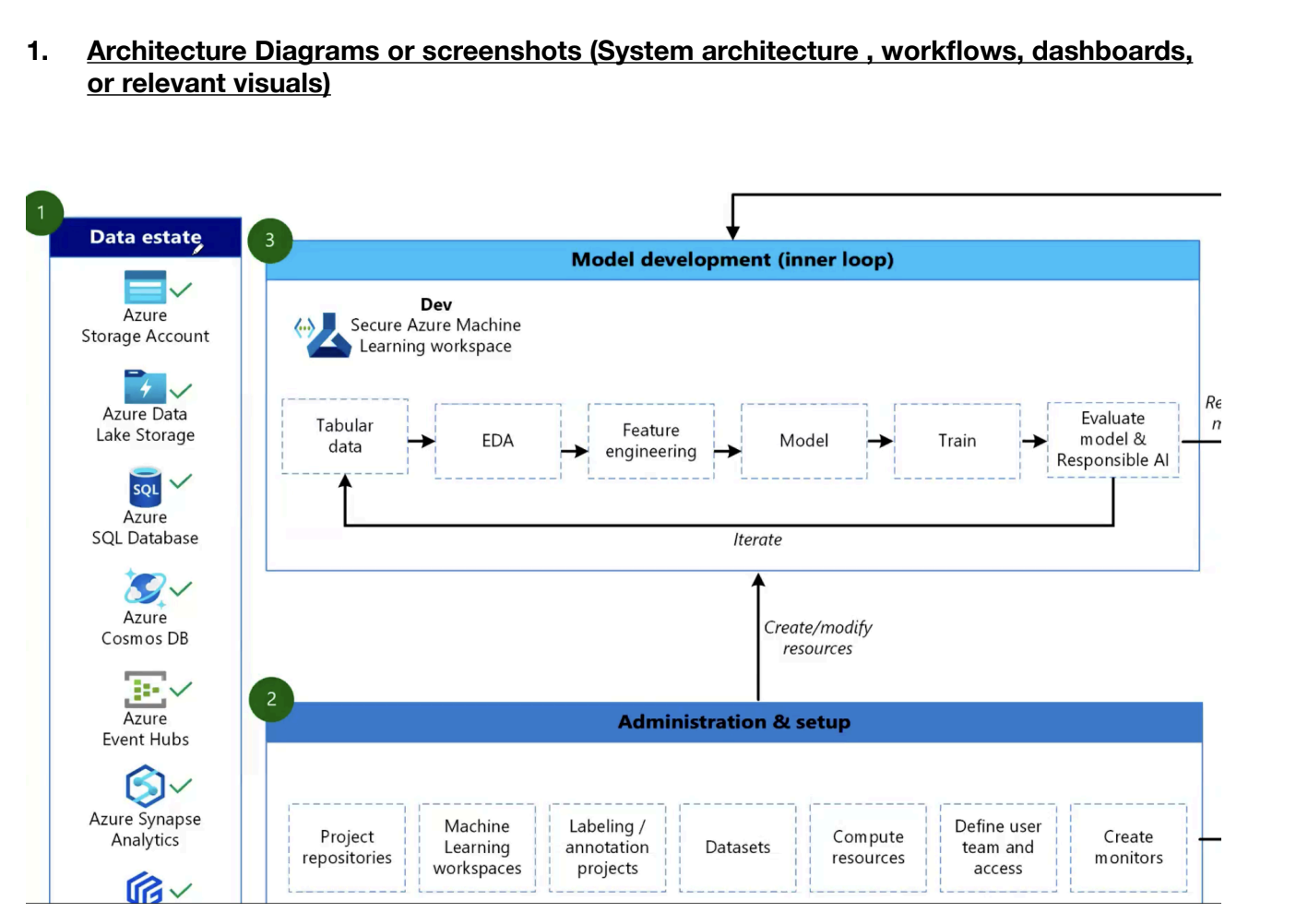
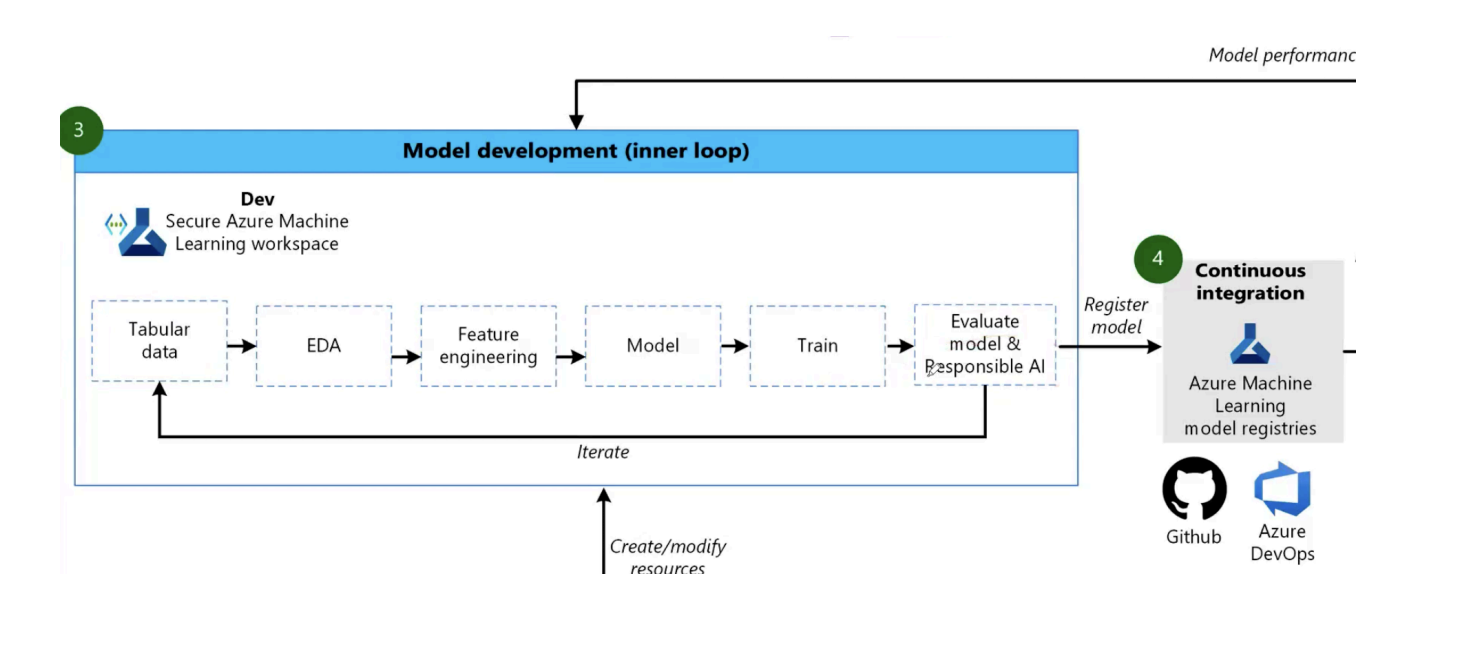
- Subscription & Identity: Create subscription-level RBAC roles (Contributor, Owner, Reader) and provision a Service Principal for CI/CD access to the cloud tenant.
- DevOps Organization: Create DevOps Org → Project → configure Project Settings with Service Connection to the cloud (Service Principal handshake).
- Repository Setup: Create repo (GitHub or Azure Repos) → enforce branch protection, set repo permissions (contribute, reviewers), add `config_infra.yml` and pipeline YAML files.
- Pipeline Security: Configure Pipeline Settings → service connections, environment approvals, and security to control who can edit build/release pipelines.
- Idempotent Provisioning: Pipelines run `deploy-infra.yaml` which checks/creates Resource Groups, Namespaces, Workspaces and sets CLI defaults — designed to be idempotent and re-runnable.
PIPELINE-1: Deploy Infrastructure (Detailed Steps)
- Repos → add/edit `config_infra.yml` (namespace, workspace name, postfix, region, sizing) → commit to infra branch.
- Create a pipeline YAML `deploy-infra.yaml` in the repo containing stages: init, validate, deploy (AzureCLI@2 tasks running `az group create`, `az ml workspace create`, `az ml compute create`).
- Pipeline triggers on PR/merge to main or manual run for environment bootstrapping; pipeline uses Service Connection to authenticate.
- Post-deploy steps: output workspace connection info, store resource IDs in pipeline artifacts, and create a verification job to run quick smoke tests.
PIPELINE-2: Deploy Model Training (Summary)
- Create `deploy-model-training-pipeline.yaml` including steps for data preparation, environment build (Docker/Conda), training job submission to Azure ML, evaluation, and MLflow model registration.
- Training runs use the workspace and compute provisioned by PIPELINE-1; successful runs register models and optionally trigger promotion pipelines (canary/prod).
- Use approvals, environment gating, and manual review for promoting models to production registries/endpoints.
Repository:
Technical Challenges & Resolutions
Challenges Faced
- Designing reproducible ML pipelines beyond notebooks
- Managing consistent environments across training runs
- Establishing objective model comparison and promotion criteria
- Wiring MLflow tracking with Azure ML pipelines
Solutions Implemented
- Standardized ML environments using Azure ML Environments (Docker + Conda)
- Integrated MLflow logging for metrics, params, and artifacts
- Implemented evaluation-based promotion logic before model registration
- Orchestrated the full lifecycle using Azure ML Pipelines via CI/CD
Azure DevOps CI/CD - Architecture & YAML Mapping
Architecture to YAML construct mapping
| Architecture Block | YAML Construct / Implementation |
|---|---|
| Azure Repos / GitHub | Trigger / pr (Pipeline triggers) |
| Azure Pipelines | Pipeline root, Stages (Orchestration framework) |
| Linux Runner | pool: vmImage (Execution environment) |
| Training Orchestration | az ml job create (AML pipeline submission) |
| ML Pipeline Definition | pipeline.yml (Azure ML pipeline spec) |
| Data Asset (Input) | azureml: <data-name>@latest |
| Training Environment | AML Environment (environment.yml, Conda + base image) |
| Training Compute | default_compute / az ml compute create |
| Data Prep Step | jobs: prep_data |
| Model Training Step | jobs: train_model |
| Model Evaluation Step | jobs: evaluate_model |
| Model Registration Step | jobs: register_model |
| Experiment Tracking | MLflow logging (mlflow.log_*) |
| Model Registry | mlflow.register_model |
| Promotion Gate | deploy_flag artifact + conditional logic |
| Failure Handling | CI fails on non-Completed AML job status |
| Observability / Logs | Azure ML run logs + Azure DevOps pipeline logs |
Assets & References
Code, diagrams, study material
GitHub Repository
Source code repository containing Azure ML pipeline configurations, YAML files, and implementation code.
Access RepositoryStudy Material Resources
Public Study Material
- YAML file generic code (Key: Value pairs)
- Official documentation of YAML file for Azure
- Downloadable PDF guides and references
Restricted Study Material
- YAML file specific configurations
- Proprietary pipeline optimization techniques
- Downloadable PDF (access limited to authorized users)